


-

About Flexfilm 2
-

Getting Started 10
-
Core Fundamentals 10
-
-

Orders & Support 83
-
Shipping 10
-
Dealer Rewards 13
-
Ordering & Account 7
-
Pre-Cut Patterns 2
-
General 9
-
Warranty 6
-
Billing & Tax 3
-
Route Package Protection 2
-
Returns & Refunds 2
-
Shop Pay 2
-
Training 1
-
Dealer & Installer Program 4
-
Selling & Quoting 9
-
Marketing & Growth 8
-
Business Operations 5
-
-

Installation Resources 19
-
Architectural 4
-
Automotive 5
-
General 10
-
-

Architectural Window Film 54
-
Safety & Compatibility 17
-
Ownership 2
-
Fundamentals 16
-
Buying Guides 4
-
Performance & Privacy 6
-
Product Guides 9
-
-

Automotive Window Film 40
-
Installation & Ownership 18
-
Product Guides 11
-
Legal & Compliance 3
-
Buying Guides 8
-
-

Tools 10
-
Cutting & Prep 3
-
Application 3
-
Measurement & Layout 2
-
Specialty 2
-
-

Plotters 8
-
Ownership 6
-
Buying Guides 2
-
-

FlexCut Software 25
-
Account & Licensing 5
-
Getting Started 10
-
Troubleshooting 2
-
Using FlexCut 8
-
-

Paint Protection Film (PPF) 10
-
Ownership 3
-
Fundamentals 4
-
Product Guides 3
-
-

Surface Coatings 13
-
Product Guides 7
-
Fundamentals 3
-
Ownership 3
-
Pattern Ratings and Comments


Pattern Ratings and Comments
Your feedback helps us improve the software for everyone.
Pattern comments provide a direct line to our design team. Every submission helps us identify issues, improve accuracy, and refine the Patterns Database.
The more detail you provide, the faster and more effectively our team can address any concerns.
Rate a Pattern or Submit a Comment
In the Database Access Tool, you can rate patterns and submit comments that are visible to our internal design team.
This feature is not intended for personal notes. Ratings and comments should be used specifically to provide feedback about the quality and accuracy of patterns.
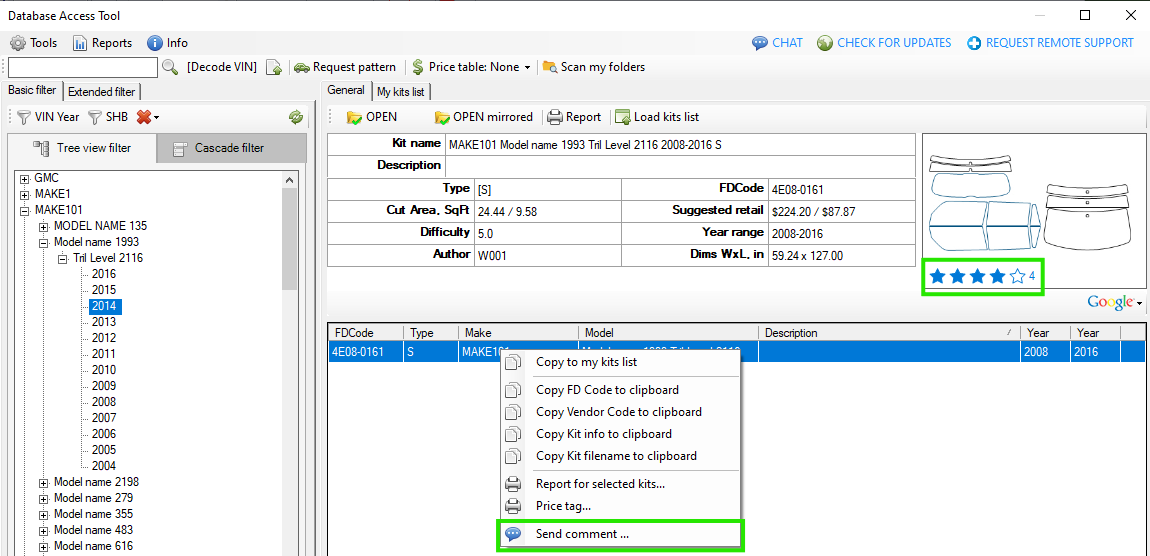
There are two ways to rate a pattern:
- Click the stars in the pattern preview section.
- Right-click the selected pattern and choose “Send comment...” from the context menu.
Choose a Rating and Add Your Feedback
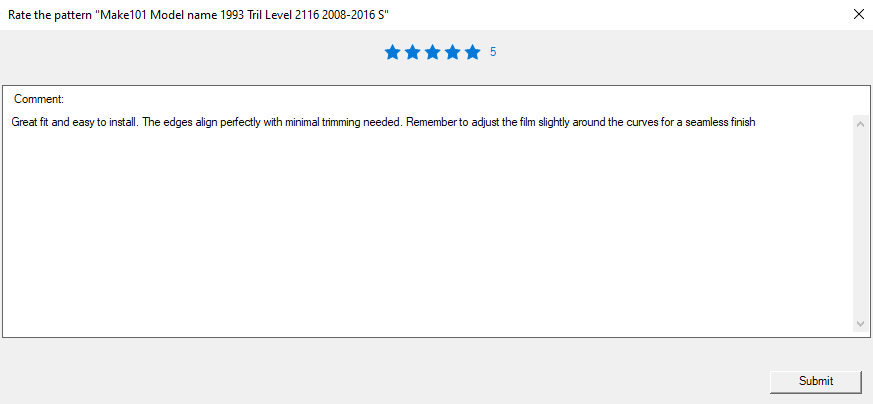
After selecting the rating or comment option, a pop-up window will appear.
From this window, you can:
- Select a star rating for the pattern.
- Add an optional comment with additional feedback about the pattern.
When submitting a comment, provide as much useful detail as possible about any fitment, accuracy, or other pattern-related issues you encountered. Detailed feedback helps our design team identify and address problems more effectively.
How Pattern Ratings Work
Your rating will be combined with ratings submitted by other users, when available. The software calculates an average rating for the pattern and displays it to all software users.
You can submit a rating without a comment, but you cannot submit a comment without also providing a rating.