



-

About Flexfilm 2
-

Getting Started 10
-
Core Fundamentals 10
-
-

Orders & Support 83
-
Shipping 10
-
Dealer Rewards 13
-
Ordering & Account 7
-
Pre-Cut Patterns 2
-
General 9
-
Warranty 6
-
Billing & Tax 3
-
Route Package Protection 2
-
Returns & Refunds 2
-
Shop Pay 2
-
Training 1
-
Dealer & Installer Program 4
-
Selling & Quoting 9
-
Marketing & Growth 8
-
Business Operations 5
-
-

Installation Resources 19
-
Architectural 4
-
Automotive 5
-
General 10
-
-

Architectural Window Film 54
-
Safety & Compatibility 17
-
Ownership 2
-
Fundamentals 16
-
Buying Guides 4
-
Performance & Privacy 6
-
Product Guides 9
-
-

Automotive Window Film 40
-
Installation & Ownership 18
-
Product Guides 11
-
Legal & Compliance 3
-
Buying Guides 8
-
-

Tools 10
-
Cutting & Prep 3
-
Application 3
-
Measurement & Layout 2
-
Specialty 2
-
-

Plotters 8
-
Ownership 6
-
Buying Guides 2
-
-

FlexCut Software 25
-
Account & Licensing 5
-
Getting Started 10
-
Troubleshooting 2
-
Using FlexCut 8
-
-

Paint Protection Film (PPF) 10
-
Ownership 3
-
Fundamentals 4
-
Product Guides 3
-
-

Surface Coatings 13
-
Product Guides 7
-
Fundamentals 3
-
Ownership 3
-
Open Patterns with Database Access Tool


Open Patterns with Database Access Tool
Opening a Pattern
-
Launch the software.
-
In the main window, click the “Open pattern from database” button on the main toolbar at the top of the screen.
-
Find the pattern you want to use in the Database Access Tool and click “Open.”
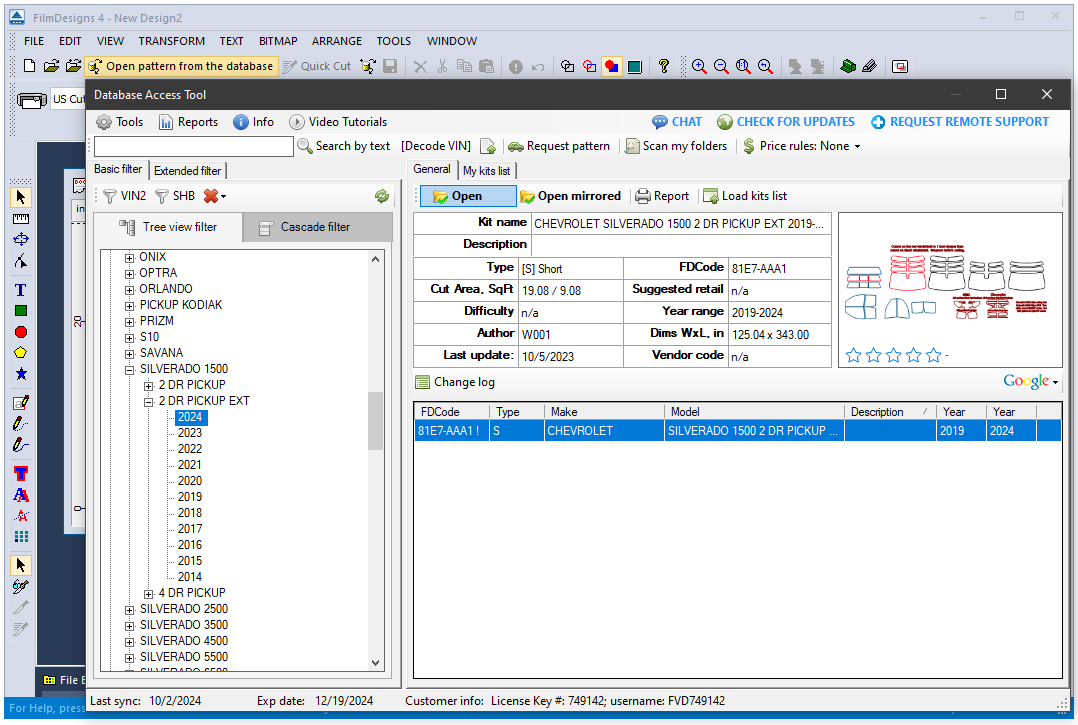
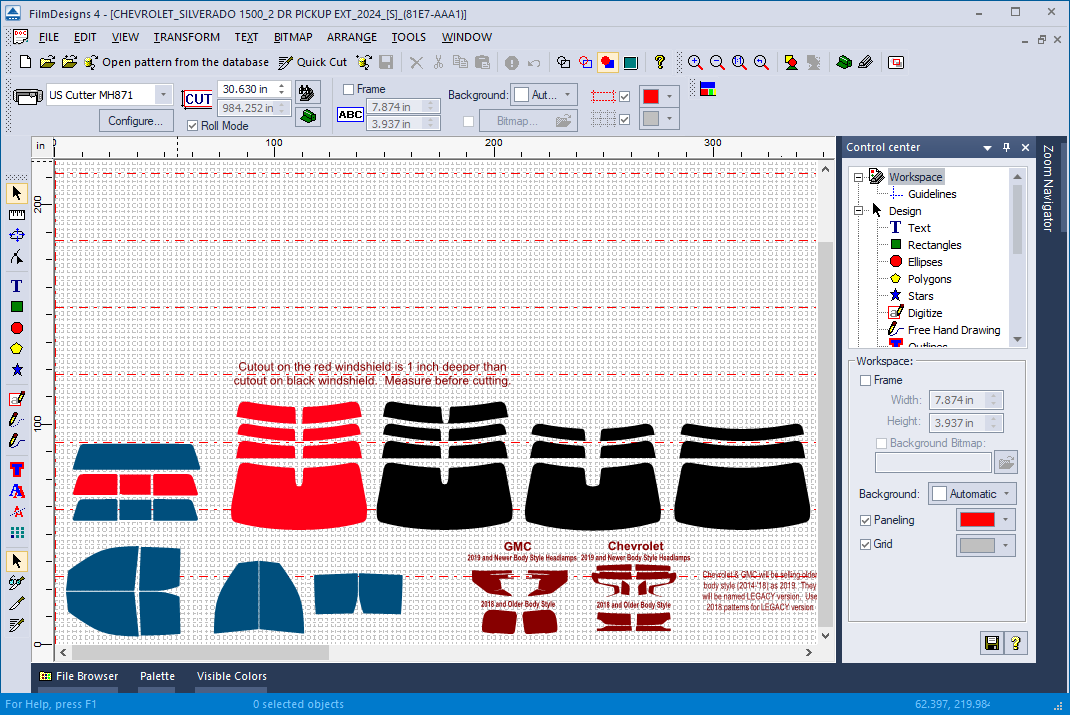
The pattern will open in the main window, where you can select specific parts and send them to the plotter.
Selecting the Correct Pattern Parts
Our designers make every effort to make it easier to select the correct part for your installation.
Some parts may appear in different colors. When this occurs, there will be a note explaining what the different colors represent.
Be sure to read these notes carefully. They provide important information about compatibility and any fine adjustments you may encounter while installing the film.
Understanding Roll Width
The red dotted lines in the workspace indicate the roll width.
Every plotter has a maximum supported roll width. The software will automatically set the maximum allowed width based on the plotter you have selected.